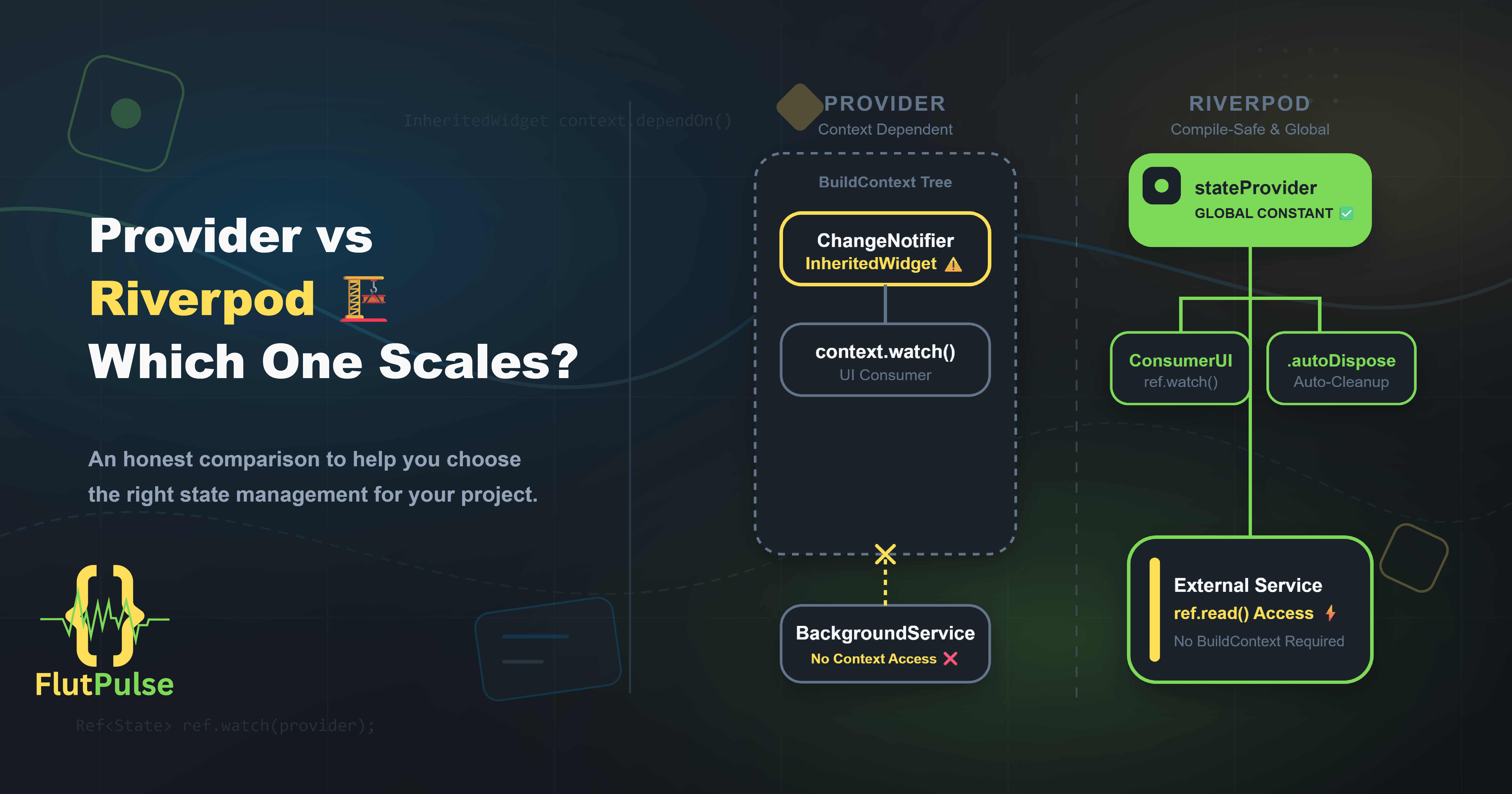
Provider vs Riverpod: Which One Actually Scales? 🏗️
Published on: August 17, 2026
Introduction
State management is one of the most debated topics in Flutter. Two packages consistently rise to the top of the conversation: Provider and Riverpod.
Both were created by the same developer — Remi Rousseau. But Riverpod wasn’t just an update to Provider. It was a ground-up rethink.
Choosing between them isn’t just a matter of preference. It can significantly affect how far your codebase can grow before it starts fighting back.
Provider: The Familiar Approach
Provider is built on top of Flutter’s InheritedWidget mechanism. It works by placing data providers high in the widget tree and consuming them below using context.
// Setup
void main() {
  runApp(
    ChangeNotifierProvider(
      create: (_) => CounterNotifier(),
      child: const MyApp(),
    ),
  );
}

// Consume
class CounterDisplay extends StatelessWidget {
  @override
  Widget build(BuildContext context) {
    final counter = context.watch<CounterNotifier>();
    return Text('${counter.count}');
  }
}
For smaller applications, this works well. The learning curve is gentle and the pattern feels natural to Flutter’s widget-centric model.
Where Provider Starts to Struggle ⚠️
As applications grow, Provider’s reliance on BuildContext becomes limiting.
Problem 1: Context dependency
You cannot access providers outside of the widget tree. Services, repositories, and background tasks that need state have no clean way to get it.
Problem 2: Combining providers is verbose
When one provider depends on another, you need ProxyProvider:
ProxyProvider<AuthService, UserRepository>(
  update: (_, auth, __) => UserRepository(auth),
  child: ...,
)
With multiple dependencies, this nesting becomes unwieldy.
Problem 3: No compile-time safety
Accessing a provider that wasn’t registered above you in the tree throws a runtime error, not a compile-time one.
Riverpod: The Rethink
Riverpod removes the dependency on BuildContext entirely. Providers are declared as global constants and accessed from anywhere — widgets, services, or tests.
// Declare as a global constant
final counterProvider = StateNotifierProvider<CounterNotifier, int>(
  (ref) => CounterNotifier(),
);

// Consume in a widget
class CounterDisplay extends ConsumerWidget {
  @override
  Widget build(BuildContext context, WidgetRef ref) {
    final count = ref.watch(counterProvider);
    return Text('$count');
  }
}

// Access outside of a widget
class SomeService {
  final Ref ref;
  SomeService(this.ref);

  void doSomething() {
    final count = ref.read(counterProvider);
  }
}
Combining Dependencies Is Clean 🔗
Riverpod makes provider dependencies explicit and readable:
final authProvider = Provider<AuthService>((ref) => AuthService());

final userRepositoryProvider = Provider<UserRepository>((ref) {
  final auth = ref.watch(authProvider);
  return UserRepository(auth);
});
No nesting. No proxies. Each provider simply declares what it needs via ref.
Compile-Time Safety 🔒
Because Riverpod providers are global constants, if a provider doesn’t exist, your code won’t compile. This moves an entire class of bugs from runtime to build time.
Performance: Auto-Dispose and Fine-Grained Updates
Riverpod introduces .autoDispose — providers that clean themselves up when no widget is watching them:
final searchResultsProvider = FutureProvider.autoDispose<List<Result>>((ref) {
  return searchApi.query(ref.watch(searchQueryProvider));
});
This is critical for features like search screens or paginated lists where you don’t want stale data hanging around.
When to Use Each
| Scenario | Provider | Riverpod |
|---|---|---|
| Small app, quick prototype | ✅ | ✅ |
| Accessing state outside widget tree | ❌ | ✅ |
| Complex interdependent state | ❌ | ✅ |
| Compile-time provider safety | ❌ | ✅ |
| Auto-disposing temporary state | ❌ | ✅ |
| Gentle learning curve | ✅ | Moderate |
The Migration Path
If you’re on Provider and considering Riverpod, the migration is incremental. Both can coexist in the same project during transition. You don’t need to rewrite everything at once.
Start by converting isolated features — a search screen, a settings page — and expand from there.
Conclusion
Provider is a solid choice for small, straightforward applications. It’s approachable and well-understood.
But Riverpod was built to scale. If your application has meaningful complexity — async data, interdependent state, or state that lives outside the widget tree — Riverpod’s architecture will carry you further without accumulating technical debt.
The choice isn’t about which is better in isolation. It’s about which one matches where your application is going.