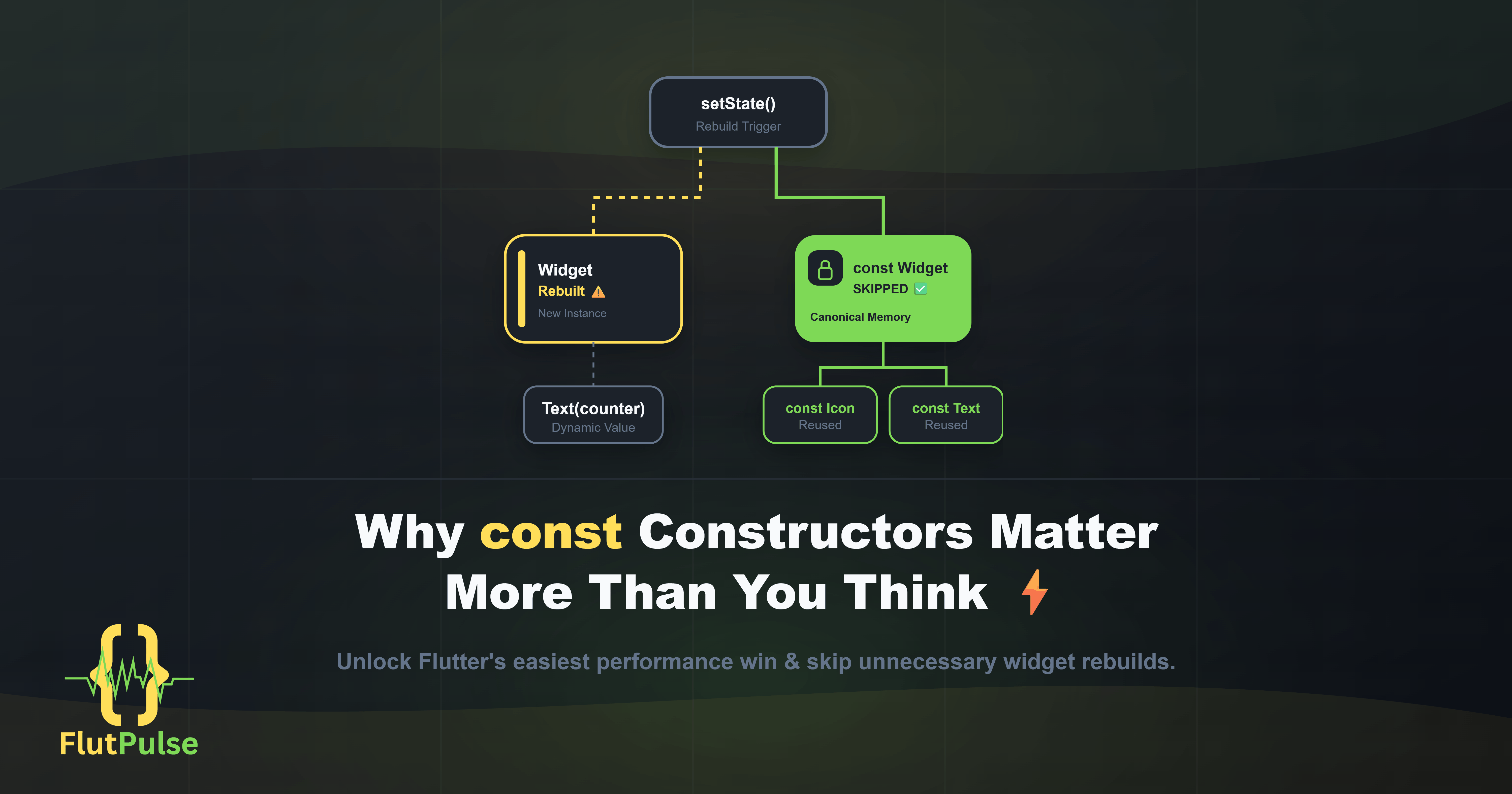
Why const Constructors Matter More Than You Think ⚡
Published on: August 13, 2026
Introduction
When Flutter developers talk about performance optimization, they often jump to complex topics: caching strategies, lazy loading, or efficient state management patterns.
But one of the most impactful improvements you can make costs you almost nothing — using const constructors.
What Does const Actually Do? 🧠
In Dart, a const constructor creates a compile-time constant. This means the object is created once and reused every time it’s needed, rather than being instantiated fresh on each build cycle.
// Without const — new instance every rebuild
Text('Hello World')

// With const — same instance reused every rebuild
const Text('Hello World')
This distinction is critical in Flutter because widgets are rebuilt constantly.
The Widget Rebuild Problem ⚠️
Flutter’s rendering engine works by rebuilding widget trees. Every time setState() is called, Flutter traverses the tree and rebuilds affected widgets.
Without const, even widgets that haven’t changed get re-instantiated:
class MyWidget extends StatefulWidget {
  @override
  State<MyWidget> createState() => _MyWidgetState();
}

class _MyWidgetState extends State<MyWidget> {
  int _counter = 0;

  @override
  Widget build(BuildContext context) {
    return Column(
      children: [
        Text('Counter: $_counter'),  // Needs to rebuild — that's fine
        Text('This never changes'),  // Rebuilt unnecessarily — wasteful
        Icon(Icons.star),            // Rebuilt unnecessarily — wasteful
      ],
    );
  }
}
Every time _counter changes, all three widgets rebuild, even the ones that display static content.
The const Fix ✅
Mark static widgets as const and Flutter will skip them entirely during rebuilds:
@override
Widget build(BuildContext context) {
  return Column(
    children: [
      Text('Counter: $_counter'),         // Rebuilds — correct
      const Text('This never changes'),   // Skipped — Flutter knows it won't change
      const Icon(Icons.star),             // Skipped — Flutter knows it won't change
    ],
  );
}
Flutter’s element tree can now recognize these widgets as identical on every pass and skip diffing them entirely.
Where const Makes the Biggest Difference 📊
The impact grows with widget complexity. Scroll through a list of 200 items, each containing several static sub-widgets — without const, you’re instantiating thousands of unnecessary objects per frame.
Common places to add const:
// Decorations
const BoxDecoration(color: Colors.white)

// EdgeInsets
const EdgeInsets.symmetric(horizontal: 16, vertical: 8)

// Text styles
const TextStyle(fontSize: 14, fontWeight: FontWeight.w500)

// Icons
const Icon(Icons.check_circle)

// SizedBox spacers
const SizedBox(height: 16)
const SizedBox.shrink()
That last one — const SizedBox.shrink() — is especially worth noting. It’s a zero-size widget used as a conditional placeholder, and it appears constantly in Flutter codebases.
How to Find Missing const Opportunities 🔍
You don’t need to hunt for them manually. The Flutter analyzer and linter will flag them automatically.
Add this to your analysis_options.yaml:
linter:
  rules:
    - prefer_const_constructors
    - prefer_const_literals_to_create_immutables
    - prefer_const_declarations
You can also run a quick command to surface all suggestions:
flutter analyze
Your IDE (VS Code or Android Studio) will also underline missing const keywords with a hint to add them.
One Important Rule
const only works when all values involved are also compile-time constants. You cannot use it with dynamic values:
// ✅ Valid — all values are compile-time constants
const Text('Static Label')

// ❌ Invalid — userName is a runtime variable
const Text(userName)

// ✅ Correct approach for dynamic values
Text(userName)  // No const, and that's fine
Quick Win Checklist ✅
Before you move on, scan your codebase for these:
SizedBoxspacers → addconstIconwidgets → addconstPaddingwith fixed values → addconstTextwith hardcoded strings → addconstBoxDecorationwith fixed properties → addconst
These are zero-risk, zero-effort changes that make Flutter’s diff engine skip work on every single rebuild.
Conclusion
const is one of the most underappreciated tools in Flutter development. It doesn’t require architectural changes, third-party packages, or complex refactoring.
It’s a single keyword that tells Flutter: this will never change, don’t waste time checking it.
That’s a message worth sending as often as possible.